Who to Use Git in Remote Job: A Complete Guide for Remote Developers
In today’s fast-evolving digital landscape, remote work has become the norm-especially in the tech industry. Whether you're a software engineer, DevOps specialist, or full-stack developer, mastering tools like Git is no longer optional-it’s essential. At techblogs.site, we believe that understanding how to use Git in remote job environments can make or break your productivity, collaboration, and career growth. This comprehensive guide dives deep into why Git is indispensable for remote developers, how to use it effectively, and real-world examples that illustrate its power in distributed teams.
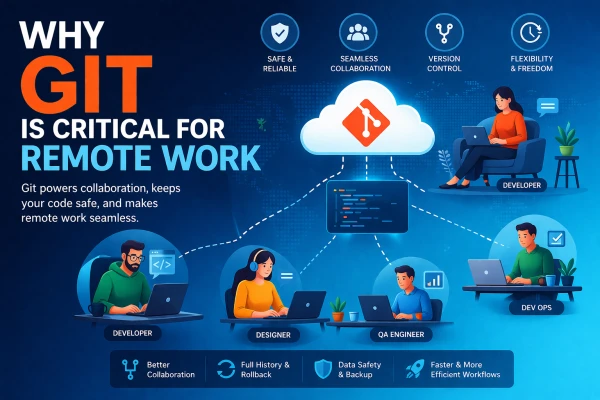
Why Git Is Critical for Remote Work
Git is a distributed version control system that tracks changes in source code during software development. While it’s used by developers worldwide, its true value shines in remote work scenarios. When team members are spread across different time zones, countries, or even continents, Git ensures that everyone stays on the same page-literally and figuratively.
Here’s why Git is a game-changer for remote jobs:
- Version Control: Git allows developers to track every change made to the codebase, making it easy to revert to previous versions if something goes wrong.
- Collaboration: Multiple developers can work on the same project simultaneously without overwriting each other’s work.
- Branching and Merging: Developers can create isolated branches to work on new features or bug fixes, then merge them back into the main codebase safely.
- Backup and Recovery: Since every developer has a full copy of the repository, data loss is minimized.
- Transparency: Git logs provide a clear history of who did what and when, improving accountability in remote teams.
How to Use Git in Remote Job Environments
Using Git effectively in a remote job isn’t just about knowing commands-it’s about adopting workflows that support asynchronous collaboration, clear communication, and code quality. Let’s break down the key practices every remote developer should follow.
1. Set Up a Central Repository
Most remote teams use platforms like GitHub, GitLab, or Bitbucket to host a central Git repository. This acts as the single source of truth for the project. Each team member clones this repository to their local machine, makes changes, and then pushes updates back to the central server.
For example, a remote team at a fintech startup might host their payment processing system on GitHub. Developers in India, Brazil, and Germany all clone the repo, work on their assigned tasks, and push changes daily. Without a central repo, coordinating such efforts would be chaotic.
2. Use Feature Branching
One of the most effective Git workflows for remote teams is feature branching. Instead of committing directly to the main branch (often called main or master), developers create a new branch for each feature or bug fix.
Example:
- A developer in Tokyo is working on a new login authentication feature. They create a branch called feature/login-oauth.
- Meanwhile, a colleague in London is fixing a bug in the user dashboard. They create bugfix/dashboard-loading.
- Both work independently, test their code, and then submit a pull request (PR) to merge their changes.
This approach prevents conflicts and allows code reviews before integration, which is crucial when team members aren’t sitting side by side.
3. Commit Often with Clear Messages
In remote work, communication is often delayed. That’s why your Git commit messages must be clear and descriptive. A commit like “fixed bug” tells you nothing. Instead, write:
- fix: resolve null pointer exception in user profile loader
- feat: add dark mode toggle to settings page
Following conventions like Conventional Commits helps automate versioning and makes it easier for teammates to understand changes at a glance-even if they’re reviewing code at 2 a.m. their time.
4. Leverage Pull Requests and Code Reviews
Pull requests (PRs) are the cornerstone of remote collaboration. When a developer finishes a task, they open a PR to propose merging their branch into the main codebase. Team members then review the code, suggest improvements, and approve or request changes.
Real-world example: A remote team at a SaaS company uses GitLab for their project management. Every PR must be reviewed by at least two senior developers. This ensures code quality and knowledge sharing, even when team members never meet in person.
Best practices for PRs in remote jobs:
- Keep PRs small and focused-ideally under 400 lines of code.
- Include a clear description of the changes and why they’re needed.
- Attach screenshots or test results if applicable.
- Respond promptly to feedback to avoid blocking the team.
5. Resolve Merge Conflicts Gracefully
Merge conflicts happen when two developers modify the same part of a file. In remote teams, these conflicts can be more frequent due to overlapping work hours or lack of real-time communication.
To handle conflicts:
- Pull the latest changes from the main branch before starting work.
- Use git status to identify conflicted files.
- Open the file and look for conflict markers
- Manually edit the file to keep the correct changes.
- Add the resolved file with git add and commit.
Pro tip: Use tools like VS Code’s Git integration or GitKraken to visualize and resolve conflicts more easily.
Real-World Examples of Git in Remote Jobs
Let’s look at how real companies and developers use Git to thrive in remote environments.
Example 1: Automattic (WordPress)
Automattic, the company behind WordPress.com, is 100% remote with over 1,900 employees across 77 countries. They rely heavily on Git and GitHub to manage thousands of repositories. Their developers use feature branches, automated testing, and rigorous code reviews to maintain code quality. Every change goes through a PR process, ensuring that even small updates are vetted by the team.
This structured Git workflow allows Automattic to scale rapidly while maintaining stability-proving that Git is not just a tool, but a cornerstone of remote engineering culture.
Example 2: A Distributed Startup Building a Mobile App
Imagine a startup with developers in Nigeria, Poland, and Canada building a fitness tracking app. They use GitLab to host their code and follow a Gitflow workflow:
- main – production-ready code
- develop – integration branch for features
- feature/* – individual feature branches
- hotfix/* – urgent fixes for production issues
When a bug is reported in the app’s calorie counter, a developer in Poland creates a hotfix/calorie-bug branch, fixes the issue, and merges it into both main and develop. The team in Nigeria reviews the fix the next morning. Without Git, coordinating this across time zones would be nearly impossible.